
Export XML from Excel 2010

Prerequisites

  1. XML file with structure matching the Excel data - can be a previously exported xml file
  2. Enable Developer tab in Excel main tabs. This can be done in Options Customize Ribbon

Exporting to xml

  1. Open Excel  file
  2. If filters are enabled go to Data tab and disable them
  3. Go to Developer tab and click Source which will open a sidbar XML Source sidebar. Click XML Maps... there
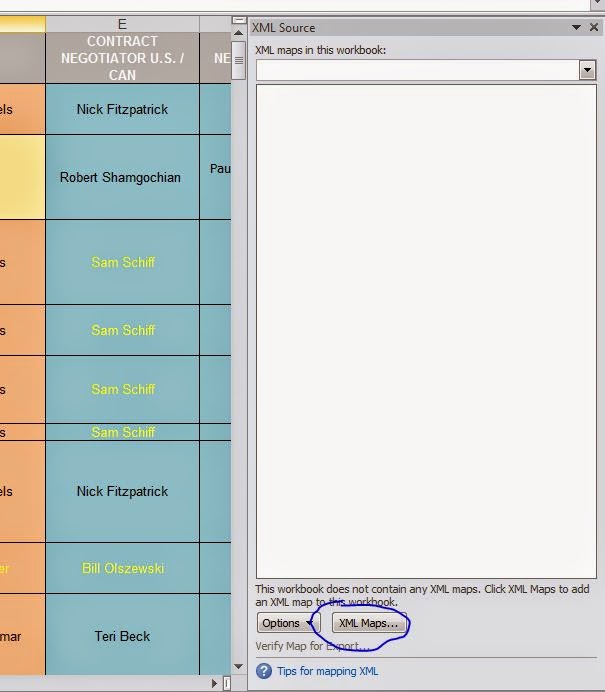
  4. In the window that pops up choose Add map  then choose the previously generated xml, click ok  in the message box that says that it doesn't contain XML Schema, and click ok to close XML Maps window.


5) Drag over the Row element to the A1 cell. This will create the xml mapping.

6) Not the xml mappings are created. Go ahead and save the file as xml. File -> Save as and choose File type as XML Data.

Comments

Popular posts from this blog

Seven C’s (7 C's) of Effective Communication

7C's of Effective Communication  Completeness –   ·           Complete communication develops and enhances the reputation of an organization. ·           Moreover, they are cost saving as no crucial information is missing and no additional cost is incurred in conveying extra message if the communication is complete. Conciseness –   ·           It is both time-saving as well as cost-saving. ·           It underlines and highlights the main message as it avoids using excessive and needless words. ·           Concise communication provides short and necessary message in limited words to the audience. ·           Concise message is more likable and comprehensible to the audience. ...

Website User Interface Design

Website User Interface Design : there are some important things which we should follow whenever we are going to design a website how much better it should be yep 1st you are a visitor of a website what have u visited there and what you need and what did you find the website yes you have visited more like text website graphic animations and others but you did not get whatever you require we should insert the graphics so that we can attract the visitors on a website but we should recommend how much easy to use this is for user. Website user analysis  Just think about the Web sites which you visit. And what did you analyze there. Is it enough for you suppose you are going to design a website for real estate website design then just think about the usability functionality of this User will not stay there more if you are not eligible to provide the right information which he need. Web based application website user interface will consist primary of user entry because he will perf...

What is Web Accessibility ?

Web Accessibility: Dear friends, I am landing here with some of my thoughts about the Website/Electronic content accessibility. This is like a " B ‘day and B ‘day Cake “which everyone should celebrate and taste it or "It is mandatory for all agencies to make website usable for all type of users" I have work out on web accessibility and got lots of information this is pretty well term to access website or electronic content for physically challenged peoples. This is basically an amendment by US Government how to make our electronic content accessible which comes under section 508.  In August 1998 Us Government passed one law for electronic content accessibility, which is really helpful for disable, younger, older age internet users. It help the other users also whose are temporary disable (Slow internet connection, lack of devices etc.) It's really emphasized the user to access the content fast as everyone expect. We can use progressive enhancement also...